10 Ways to Reduce Energy Costs with Smart Home Automation
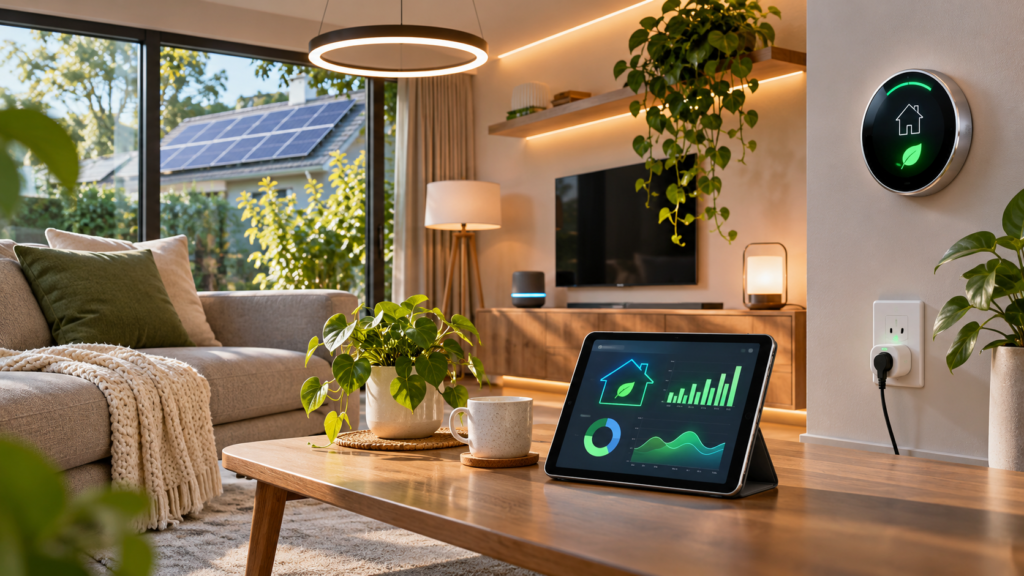
Rising utility bills are one of the most practical reasons to invest in connected devices, and learning how to reduce energy costs with smart home automation is easier than most people expect. The biggest wins come from devices that turn things off when nobody needs them, dial back heating and cooling, and shift heavy loads to cheaper hours — all without sacrificing comfort.
You don’t need a huge budget or a fully wired house to start. A handful of well-chosen devices, paired with a few thoughtful automations, can trim a noticeable amount from your monthly bill. The ten strategies below move roughly from highest impact to finishing touches, so you can start where the savings are largest. If you’re brand new to this space, our guide to automating smart home devices for beginners covers the fundamentals first.
Key Takeaways
- A smart thermostat with optimized schedules targets your single biggest energy expense
- Smart plugs eliminate phantom power drain from standby electronics
- Motion sensors, dimmers, and schedules stop lights running in empty rooms
- Smart blinds provide free passive heating and cooling
- A whole-home energy monitor shows exactly where your money goes
- Geofencing automates savings the moment everyone leaves
- Shifting appliances to off-peak hours cuts costs on time-of-use plans
- Smart water heater controls trim the second-largest home energy expense
- Home Assistant and similar hubs unlock advanced energy-saving logic
- Regular audits keep automations aligned with the seasons and your habits
1. Install a Smart Thermostat and Optimize HVAC Schedules
Heating and cooling typically account for roughly half of a home’s energy consumption, which makes the thermostat the highest-leverage device you can automate. A smart thermostat replaces fixed guesswork with adaptive schedules, remote sensors, and automatic setbacks that reduce runtime when the house is empty or everyone is asleep.
The savings are well documented. ENERGY STAR estimates that certified smart thermostats save around 8 percent on heating and cooling energy on average, and broader guidance suggests that setting the temperature back 7 to 10 degrees for eight hours a day can save up to 10 percent annually on HVAC costs.
To get the most from one:
- Program realistic schedules around when the house is actually occupied, including separate weekday and weekend routines.
- Use eco or away modes rather than fully shutting the system down — recovering from extreme temperatures wastes more energy than maintaining a modest setback.
- Place remote room sensors in the spaces you actually use so the system conditions bedrooms at night instead of the hallway where the thermostat hangs.
- Enable maintenance reminders, since a clogged filter forces the system to work harder and quietly erodes your savings.
One common beginner mistake is constantly overriding the schedule from a phone. If you find yourself doing that daily, adjust the baseline schedule instead — the automation should reflect your real life, not fight it.
2. Cut Phantom Power Drain with Smart Plugs and Smart Power Strips
Phantom power drain — the electricity devices consume while switched “off” — is one of the sneakiest line items on a utility bill. Televisions, game consoles, cable boxes, printers, and desktop PCs all sip power around the clock, and estimates commonly put standby consumption at 5 to 10 percent of residential electricity use.
Smart plugs with energy monitoring solve this in two ways. First, they show you exactly how many watts each device draws in standby, so you can find the worst offenders instead of guessing. Second, they let you cut power completely on a schedule — for example, killing the entertainment center from midnight to 5 p.m. on weekdays.
Smart power strips take the idea further by linking outlets together: when the TV turns off, the strip automatically cuts power to the soundbar, console, and streaming box attached to it. That removes the entire cluster’s standby draw with a single trigger.
A few cautions matter here. Never plug high-draw appliances like space heaters, air conditioners, or dryers into a standard smart plug — most are rated for 10 to 15 amps, and overloading one is a fire risk. Also avoid cutting standby power to devices that genuinely need it, such as a DVR scheduled to record or a router that handles nighttime updates.
3. Automate Lighting with Motion Sensors, Dimmers, and Schedules
Lighting makes up a meaningful share of home electricity use, and the cheapest automated fix isn’t a smarter bulb — it’s making sure lights simply aren’t on in empty rooms. If you haven’t already, switching to LED bulbs first multiplies every other saving, since LEDs use a fraction of the power of incandescents.
Three automation approaches cover most situations:
- Motion and occupancy sensors work best in transitional spaces like hallways, bathrooms, closets, laundry rooms, and garages — anywhere people enter with their hands full and forget the switch on the way out.
- Schedules and sunset triggers handle predictable needs: porch lights that turn on at dusk and off at bedtime, or bedroom lamps that fade on before your alarm.
- Dimmers and scenes reduce consumption even while lights are on. Running a bulb at 70 percent brightness is barely noticeable but measurably cheaper, and a “movie night” scene can light a room at a fraction of full output.
For outdoor lighting, pairing a smart switch or bulb with a dusk-to-dawn routine prevents the classic mistake of a porch light burning all afternoon because nobody noticed it was still on.
4. Use Smart Blinds or Shades for Passive Heating and Cooling
Windows are a major source of heat gain in summer and heat loss in winter, and smart blinds turn that weakness into a tool. Motorized shades — whether full replacements or retrofit devices that motorize existing blinds — can open and close automatically based on time of day, sun position, or indoor temperature.
The logic flips with the seasons. In summer, closing south- and west-facing shades during peak afternoon sun blocks solar heat before your air conditioner has to fight it. In winter, the opposite applies: open those same shades during daylight to harvest free solar warmth, then close everything at night to add an insulating layer against cold glass.
More advanced setups tie blinds directly to a temperature sensor or thermostat, so shades react to actual conditions rather than a fixed clock. Even a simple schedule delivers most of the benefit, though — the key is consistency, since manually adjusted blinds tend to stay in whatever position they were left in.
5. Track Consumption with a Whole-Home Energy Monitor
You can’t optimize what you can’t measure. A whole-home energy monitor installs in your electrical panel using clamp-on sensors around the main service lines, then reports real-time consumption to an app — often broken down by individual device signatures. Popular options include monitors that identify specific appliances automatically and simpler models that show circuit-level totals.
The payoff is visibility. Within a few weeks, a monitor will reveal things most people never suspect: an aging dehumidifier drawing 600 watts constantly, a well pump cycling at odd hours, or a garage freezer quietly doubling its consumption. Each discovery points to a specific automation or replacement that pays for itself.
Two practical notes before buying. First, installation involves working inside your electrical panel — some homeowners do this themselves, but hiring an electrician is cheap insurance if you’re not comfortable near live service wires. Second, treat the monitor as a diagnostic tool, not a set-and-forget gadget: its value comes from the monthly habit of checking where your kilowatt-hours actually went.
6. Set Up Geofencing and Away-Mode Routines
Schedules are guesses; geofencing is ground truth. By using your phone’s location, a geofencing thermostat and away-mode routine can trigger real savings the moment the last person leaves — dropping the HVAC to eco mode, turning off forgotten lights, and cutting smart plugs feeding standby devices.
Most major thermostat platforms support geofencing natively, and hub ecosystems let you build a broader “leaving home” scene around it. If you’re new to chaining devices together, our walkthrough on setting up smart home routines shows the general process across popular platforms.
The critical detail for households: base the trigger on everyone being gone, not just one phone. An automation that drops the heat when you leave for an errand — while your partner is still home — creates complaints fast and trains people to disable the system. Most platforms let you pool multiple household members’ locations for exactly this reason.
7. Shift Energy-Hungry Appliances to Off-Peak Hours
If your utility uses time-of-use electricity rates, the same kilowatt-hour can cost two or three times more during peak windows — typically late afternoon and early evening — than overnight. Shifting flexible loads off-peak is pure savings with zero comfort loss, and automation makes it effortless.
The best candidates are appliances whose timing doesn’t matter:
- Dishwashers and washing machines often have built-in delay-start buttons; a simple bedtime routine or a fixed 11 p.m. start handles the rest.
- EV charging is usually the largest flexible load in a home that has one — scheduled charging through the car’s app or a smart charger can move it entirely into the cheapest hours.
- Pool pumps and water heaters can run on timers that avoid peak windows entirely.
Check your utility bill or provider’s website before building these automations — this strategy only pays off on time-of-use, demand-based, or critical-peak pricing plans. If you’re on a flat rate, shifting loads saves nothing, though it can still reduce strain on the grid.
8. Control Water Heating with Smart Switches and Schedules
Water heating is typically the second-largest energy expense in a home, after HVAC. A conventional electric tank heater keeps dozens of gallons hot around the clock — including the hours when nobody showers, runs the dishwasher, or washes anything at all.
Smart controls attack that waste two ways. Scheduling lets the tank heat water before morning and evening demand, then coast during the workday and overnight. Some dedicated smart water heater controllers and smart-panel integrations add app control and usage tracking on top of simple timing.
Two important safety points apply here. First, an electric water heater is a 240-volt, high-amperage appliance — only use switches and relays explicitly rated for that load, and have an electrician install anything you’re not confident about. Second, keep the thermostat setpoint at the commonly recommended 120°F rather than cranking it lower; going too cool creates both comfort and bacterial-growth concerns.
9. Build Advanced Energy Automations in Home Assistant or Your Preferred Hub
Once individual devices are saving money, a dedicated home energy management system ties them together with logic that standalone apps can’t match. Home Assistant is the most powerful option for this — its built-in Energy Dashboard tracks grid consumption, solar production, and per-device usage — but SmartThings, Apple Home, and Google Home routines can handle simpler versions of the same ideas.
Useful advanced automations to build include:
- Peak-shaving: when the whole-home monitor detects consumption above a threshold, automatically shed non-essential loads like the dehumidifier or a space heater.
- Zombie-device alerts: notify you if a smart plug reports draw past a certain hour, or if the basement freezer’s consumption suddenly spikes — often the first sign of a failing compressor.
- Solar-aware scheduling: if you have panels, run the dishwasher and charge the EV when production is high rather than exporting power cheaply and buying it back at night.
- Vacation mode: one trigger that drops the water heater, sets HVAC to minimal setback, and randomizes a few lights for security.
The mental model that helps most: think in terms of states (home, away, asleep, peak-pricing) rather than individual devices. Build automations around those states first, then hang specific devices off them.
10. Audit Your Setup Regularly and Adjust for Seasonal Changes
An energy-saving smart home isn’t finished — it’s maintained. An automation tuned perfectly in July actively wastes money in January if nobody flipped the blind logic or adjusted the thermostat schedule.
A simple quarterly habit keeps everything aligned:
- Review your whole-home monitor and utility bill monthly, and compare against the same period before you automated.
- Swap seasonal logic twice a year: blind schedules, thermostat setpoints, ceiling-fan direction, and which rooms get priority heating or cooling.
- Prune automations that no longer fire correctly — a routine referencing a device you unplugged months ago is a classic source of silent failure.
- Re-scan for phantom loads whenever you add electronics; a new game console or office PC changes the baseline.
Many of the frustrations people hit at this stage — unreliable triggers, routines fighting each other, automations nobody remembers creating — trace back to avoidable setup errors. Our guide to common smart home setup mistakes is worth a read before your system grows much further.
Frequently Asked Questions
How much can smart home automation actually save on energy bills?
It depends heavily on your starting point. Households that leave lights on, run HVAC constantly, and never touch the thermostat see the largest gains — often 10 to 20 percent combined across heating, cooling, and standby loads. Smart thermostats alone are estimated at around 8 percent savings on HVAC energy. If your home is already efficient, expect more modest but still worthwhile returns.
Don’t smart devices add to my electricity bill themselves?
They do draw a small amount of standby power — a typical Wi-Fi smart plug uses roughly one to two watts, which costs well under a few dollars per year. The devices they control almost always save far more than they consume, but it’s still smart to buy only what solves a real problem rather than blanketing the house in gadgets.
Do I need a hub or expensive ecosystem to do any of this?
No. Many of the biggest wins — a smart thermostat, energy-monitoring plugs, scheduled lighting — work over Wi-Fi with nothing else required. A hub becomes valuable as your system grows and you want devices from different brands to cooperate reliably. Our guide on connecting smart home devices without a hub explains what works standalone and when a hub starts making sense.
Conclusion
Reducing energy costs with smart home automation works because it attacks waste at the source: HVAC running for an empty house, lights glowing in empty rooms, and electronics sipping power all night. Start with the thermostat, measure what your home actually consumes, and let the data tell you where to automate next.
The real secret is that these ten strategies compound. A thermostat setback plus geofencing plus off-peak scheduling plus monitored phantom loads adds up to a bill that’s measurably lower every month — with no ongoing effort once the routines are in place. Pick one section above, implement it this week, and build from there.